
Download Klavaro Touch Typing Tutor – touch typing tutor, free typing app, keyboard training, learn to type, improve typing speed
Overview
Klavaro Touch Typing Tutor is a free mobile application designed to support users in mastering touch typing, a foundational skill for efficient digital communication. The app targets individuals seeking to improve their typing speed and accuracy through structured, guided learning. It is particularly beneficial for students, professionals, and anyone who spends significant time interacting with digital devices. By eliminating the need to look at the keyboard, touch typing enhances productivity and reduces typing errors, making it a valuable skill in both academic and work environments.
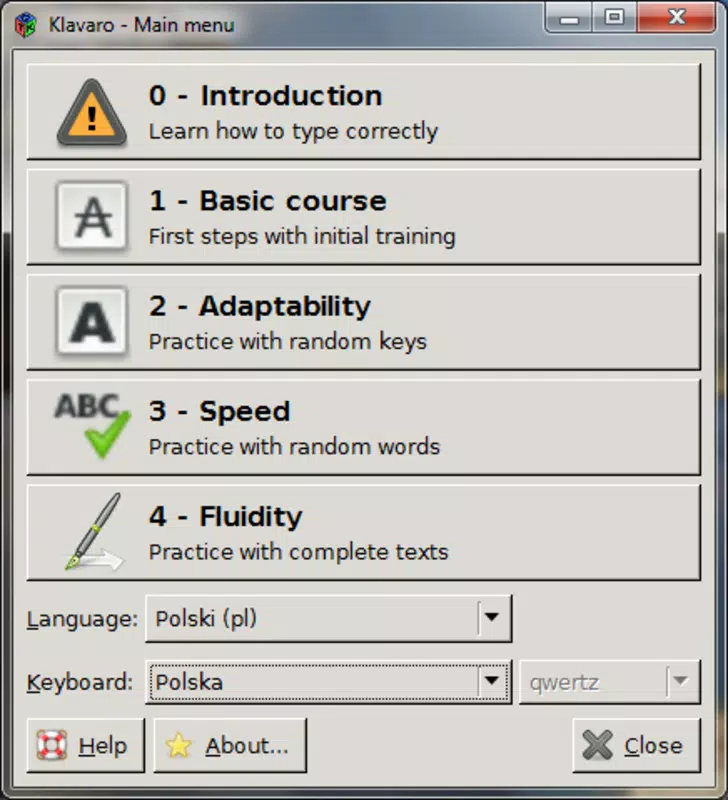
The app supports multiple languages and keyboard layouts, allowing users to tailor their learning experience to their native language and hardware setup. For instance, the Qwerty_en layout is available for English speakers. This flexibility ensures accessibility across diverse linguistic and regional contexts. The developer, Klavaro, has focused on creating a tool that is both educational and practical, with real-world applications in daily tasks such as writing emails, taking notes, and completing online forms.
Although the developer did not provide additional technical details, the app’s presence in the education category suggests a focus on learning outcomes. Its ability to adapt to different keyboard types and languages positions it as a versatile tool within the mobile learning ecosystem. For users aiming to build long-term typing proficiency, Klavaro Touch Typing Tutor offers a structured, accessible, and free solution to develop a critical digital literacy skill.
Key Features & Functionality
- Language and Keyboard Compatibility: Klavaro Touch Typing Tutor supports multiple languages and keyboard layouts, enabling users to learn touch typing in their preferred language and on their specific keyboard configuration. This feature ensures broad accessibility, especially for non-English speakers and users with regional keyboard setups.
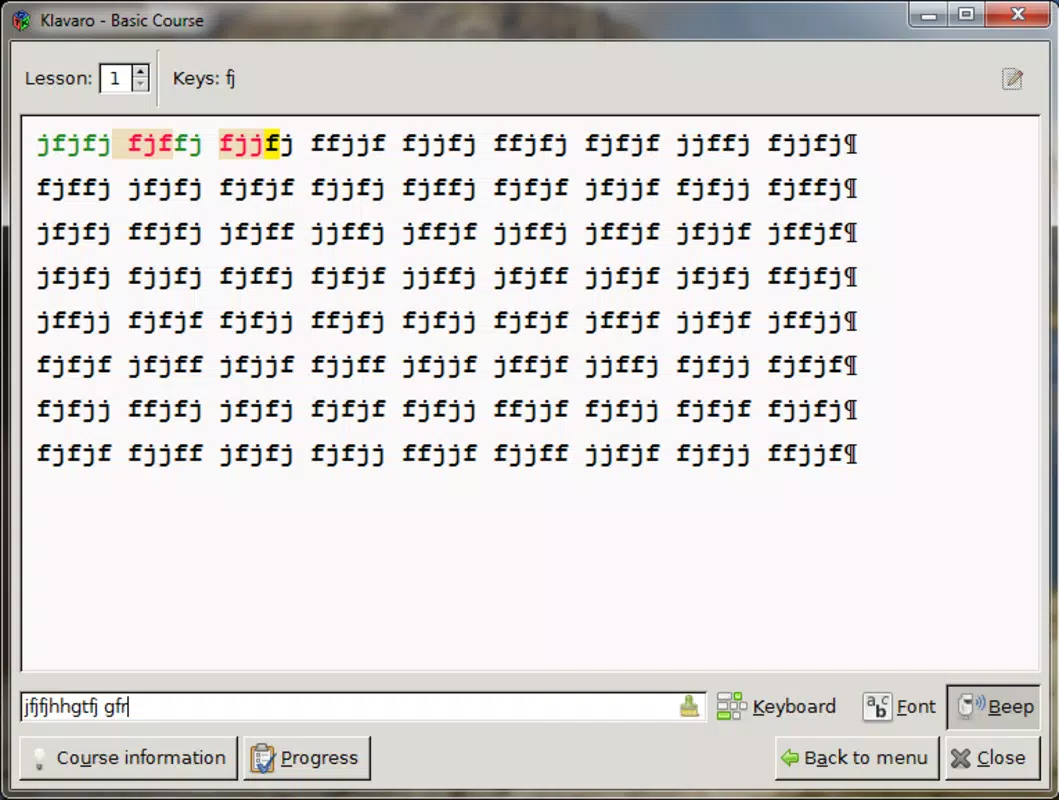
- Diverse Typing Exercises: The app includes a range of exercises targeting adaptability, speed, word completion, and typing fluidity. These exercises are structured to accommodate users at various skill levels, from beginners to those seeking to refine their technique.
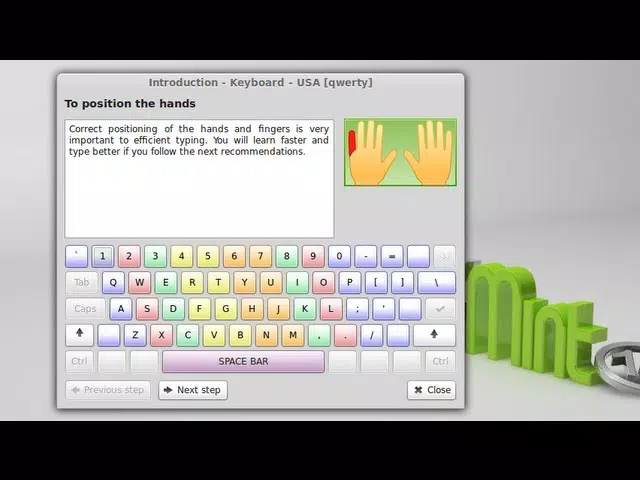
- Guided Learning for Beginners: For users new to touch typing, the app provides clear instructions on proper finger placement and key assignments. This foundational guidance helps learners establish correct habits from the start, reducing the risk of developing inefficient typing patterns.
- Progress Tracking and Visualization: Users can monitor their improvement over time through periodic tests. The app presents progress data in graphical form, allowing users to visually assess gains in speed and accuracy, which supports motivation and goal setting.
- User-Friendly Interface: The interface is designed for intuitive navigation, minimizing distractions and allowing users to focus on practice. Clear menus and logical layout enhance usability, especially for younger or less tech-savvy learners.
These features collectively create a learning environment that is both effective and engaging. For example, a student preparing for online exams can use the speed-focused exercises to reduce response time, while a professional can leverage the accuracy drills to improve document quality. The app’s modular design allows users to customize their practice sessions based on individual goals.
Interface, UX & Performance
The user interface of Klavaro Touch Typing Tutor reflects a clean, minimalist design focused on functionality. The layout emphasizes clarity, with exercises presented in a logical sequence that guides users through their learning journey. Navigation is straightforward, relying on simple tap-based interactions that are consistent across screens. This reduces cognitive load and allows users to concentrate on typing practice rather than app mechanics.
Although the developer did not list formal performance metrics, the app’s 12.4 MB file size suggests efficient resource usage. This lightweight footprint indicates optimized performance, which is beneficial for devices with limited storage or older hardware. The app responds promptly to user input, and transitions between exercises are smooth, contributing to a seamless learning experience.
Stability appears to be well-maintained, as the app functions without reported crashes in its current version. While specific device compatibility details were not disclosed, the app’s small size and standard Android requirements suggest broad support across mid-range and entry-level smartphones. Users can expect consistent behavior across different screen sizes and resolutions, though the developer did not provide formal testing data.
Platform Compatibility & Technical Requirements
Klavaro Touch Typing Tutor is available on the Android platform, making it accessible to a wide range of smartphone users. The current version is 1.2.2, released on May 20, 2024. The app has a file size of 12.4 MB, which is compact and suitable for devices with limited storage capacity.
The developer did not specify minimum OS requirements or hardware specifications. As such, compatibility with specific Android versions or device categories cannot be confirmed. However, the app’s lightweight nature suggests it may run efficiently on devices with older Android versions, though users are advised to check their device’s system settings for any updates or compatibility alerts.
Pros and Cons
Pros
- Completely free to download and use, with no in-app purchases or ads.
- Supports multiple languages and keyboard layouts for personalized learning.
- Includes guided instruction for beginners to establish proper typing habits.
- Offers visual progress tracking to monitor improvement over time.
- Compact file size ensures easy installation and minimal storage impact.
Cons
- Specific system requirements were not listed by the developer.
- Compatibility with older Android versions remains unconfirmed.
- No information on cloud sync or cross-device progress tracking.
- Limited customization options for exercise difficulty were not disclosed.
- Developer did not provide details on update frequency or long-term support.
FAQ
Is Klavaro Touch Typing Tutor safe to download?
Yes, the app is free and available through official Android channels. Its small file size and lack of suspicious permissions suggest a low risk of malware. Users should always download from trusted sources to ensure security.
Can I use this app on iOS devices?
As of now, the app is only available on Android. There is no official iOS version listed by the developer.
Does the app require an internet connection?
The app functions offline, allowing users to practice typing without needing a constant internet connection. All exercises and progress data are stored locally.
How often should I use the app to see results?
Consistent daily practice of 10–15 minutes is recommended to build muscle memory and observe measurable progress over time.
Is my typing progress saved between sessions?
Yes, the app retains user progress locally on the device. However, the developer did not specify whether data can be synced across multiple devices.
Final Thoughts
Klavaro Touch Typing Tutor stands out as a reliable, free tool for anyone aiming to develop or refine touch typing skills. Its language and keyboard flexibility, combined with structured exercises and visual feedback, make it a practical choice for learners of all levels. The clean interface and minimal system demands enhance accessibility, particularly for users with basic smartphones.
While some technical details remain unspecified, the app delivers on its core promise: effective, distraction-free typing education. It is especially valuable for students, remote workers, and digital beginners seeking to boost efficiency. With no cost and a lightweight design, it offers strong value for users committed to long-term skill development.
Download Klavaro Touch Typing Tutor now


